Inside the code scanner
Point Evlio at a repo and it reads your source the way a senior engineer would: it finds the frameworks, follows the routers, and pulls out every real endpoint across four language ecosystems. No annotations to add, no config to write, no code to run.
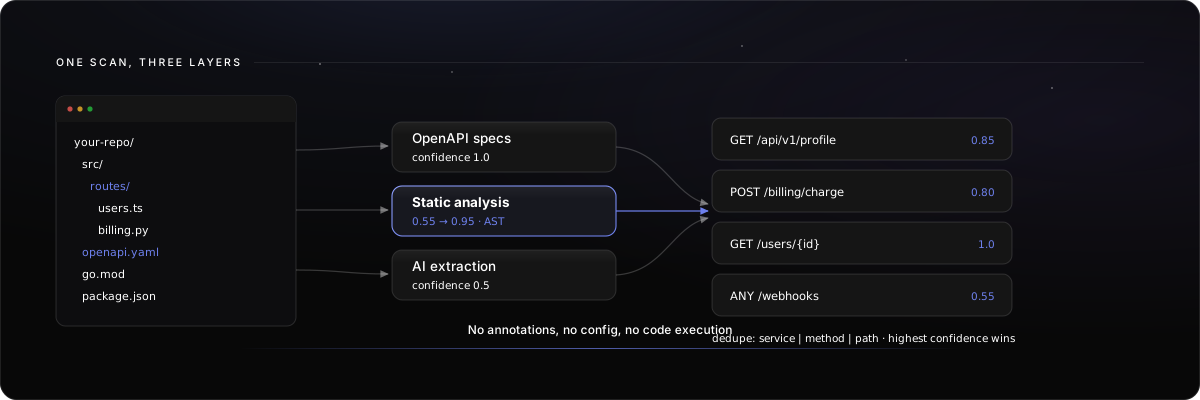
One scan, three layers of discovery, every endpoint scored by confidence.
The scanner is the muscle behind the living catalog. This page opens it up so you can judge the depth before you connect a single repo.
Static parse only. Evlio reads your code with an AST parser and pattern matchers. It never executes your code, never installs your dependencies, and never runs your tests. The clone is shallow, lands in a temp directory, and is deleted the moment the scan finishes.
Three layers of discovery
Evlio does not rely on a single trick. It runs three passes over the clone and keeps the strongest signal for every route, so a repo with a hand-written spec, framework routes, and undocumented handlers all end up in one catalog.
1. OpenAPI and Swagger specs. If your repo already ships a contract (openapi.yaml, swagger.json, api-docs, and friends), Evlio parses it directly. These endpoints carry a discovery confidence of 1.0, because the spec is the source of truth. The raw spec files are archived too, so insights and MCP generation can use the original contract.
2. Static analysis of framework routes. Evlio walks your actual source with a real parser (ts-morph for JS/TS) and resolves routes the way the framework does at runtime, including mounted-router prefixes. Confidence lands between 0.55 and 0.95 depending on how unambiguous the route is.
3. AI fallback extraction. When AI scanning is enabled, Evlio sends routing-looking files that the first two passes missed to an LLM, which extracts endpoints at confidence 0.5. This catches custom routers and exotic patterns the static analyzers do not know.
Endpoints are deduplicated by service | method | path, and the highest-confidence discovery wins. A route found in both your spec and your code is counted once, at confidence 1.0.
Language and framework coverage
Static analysis is tuned per framework. Each detector knows the idioms of its ecosystem, from Express route chaining to Spring’s class-level @RequestMapping base paths.
JavaScript / TypeScript | Express, Fastify, NestJS, Koa, Hono | NestJS |
Python | FastAPI, Flask, Django | FastAPI decorators |
Go | gin, echo, chi, net/http | Router calls |
Java / Kotlin | Spring MVC | Method annotations ( |
Any (spec) | OpenAPI 3.x, Swagger 2.0 |
|
Any (AI) | LLM fallback on routing files |
|
The JS/TS analyzer resolves mounted prefixes across files, so app.use('/api/v1', userRouter) plus userRouter.get('/profile') correctly produces /api/v1/profile. Local mounts override file-level mounts, and template-literal routes keep their shape by swapping ${...} for {param}.
What each service becomes
Before scanning routes, Evlio splits your repo into services by detecting manifest files. A monorepo with a Node gateway, a Go worker, and a Python service is scanned as three distinct services, each with its own language and framework.
| Node service (express / fastify / nestjs / koa / hono) |
| Go service (gin / echo / chi) |
| Java or Kotlin service (Spring) |
| Python service (fastapi / flask / django) |
| Container service |
| Spec-only service |
Nested workspace roots are collapsed so an aggregator package.json at the repo root does not shadow real sub-services.
The scan pipeline
A scan job moves through named stages, and the progress bar you see in the app maps directly to them. You can follow the same progress from the terminal with evlio repo status <job_id> --wait.
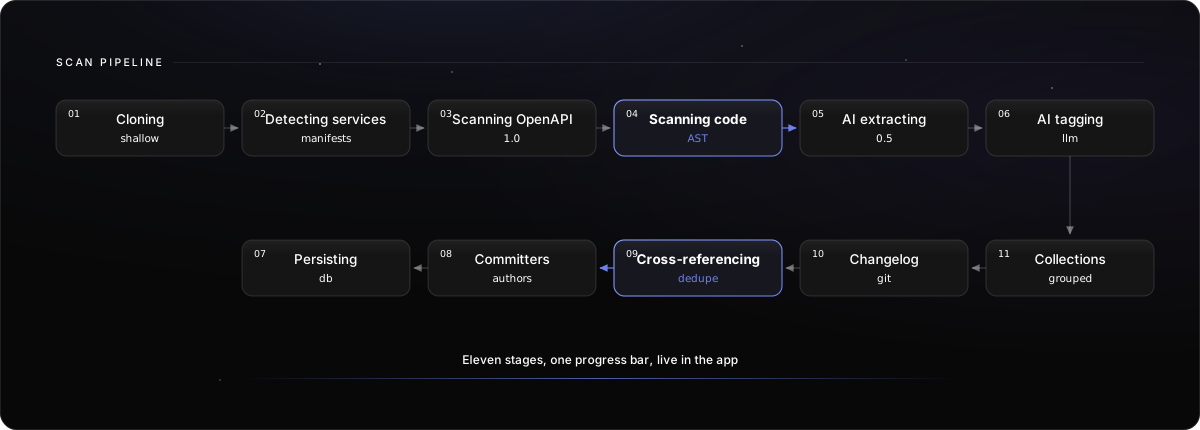
- Clone and detect. Queued, cloning, then detecting services from manifest files.
- Discover. Scanning OpenAPI specs, scanning code, then AI extraction and AI tagging when AI scanning is enabled.
- Build the catalog. Persisting collections, fetching committers for ownership, and cross-referencing callers.
- Finish. Done, failed, or cancelled. Failed scans list the step and error in the scan result; fix the cause and sync again.
On this page
- Inside the code scanner